Autumnal Elegance: Mastering Projects with Leaves
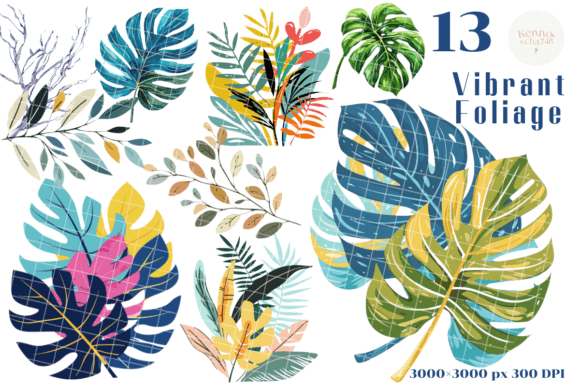
In the world of design, capturing the fleeting beauty of nature requires more than just a photograph; it demands texture, depth, and versatility. This is exactly where the Leaves collection steps in. It is not merely a set of decorative elements, but a comprehensive toolkit designed to bring the organic warmth of the outdoors into your digital and physical creations. If you have ever struggled to find botanical assets that don't look overly digital or flat, this set of 13 individual PNG images offers a refreshing solution. With a high resolution of 300dpi and a substantial size of 3000x3000 pixels, these assets are built for serious work, ensuring that whether you are designing a tiny place card or a massive piece of wall art, the detail remains crisp and professional.
Understanding the Anatomy of Leaves
When you download this package, you aren't just getting static images. You are receiving 13 distinct leaf variations, each rendered as a PNG with a transparent background. This technical specification is crucial for modern workflows. The transparency means you can layer these leaves over any background—be it a textured paper, a solid brand color, or a complex photograph—without the hassle of manual masking or awkward white borders. The "Leaves" aesthetic here is rooted in realism but curated for versatility. The textures are rich, capturing the subtle gradients and veining found in nature, which allows them to fit seamlessly into both rustic and modern design contexts.
The visual personality of this set is one of organic sophistication. It avoids the overly stylized look of clip art, leaning instead toward a premium, artistic feel. This makes it an ideal premium font alternative for visual hierarchy in designs where typography alone isn't enough. While it isn't a typeface in the traditional sense, the visual weight of these leaves can act as a display font equivalent for your graphics, drawing the eye and establishing a mood instantly.
From Screen to Stationery: Real-World Applications
The true value of any design asset lies in its application. The Leaves collection shines brightest when applied to tangible, real-world projects. Consider the realm of packaging design and editorial design. For a small business owner creating a logo or a suite of brand identity materials, these leaves offer a way to add a signature botanical touch without commissioning custom illustration. They work beautifully as accents for logo design, framing a wordmark or adding a seasonal touch to social media headers.
For the crafter and hobbyist, the applications are boundless. Because the files are high-resolution, they are perfect for:
- Scrapbooking and Cardmaking: Create layered, dimensional looks that mimic physical die-cuts.
- Wedding Stationery: Design elegant invitations, menus, and save-the-dates that feel cohesive and bespoke.
- Decorated Furniture and Decoupage: Use the high-res files to print transfers for furniture upcycling projects, ensuring the image doesn't pixelate on large surfaces.
- Jewelry and Tags: The 3000x3000px size allows you to zoom in on specific veins or sections of a leaf to create unique textures for pendants or gift tags.
Imagine a set of wedding place cards. Instead of a plain serif font or sans serif font on white cardstock, you can lay a translucent leaf overlay in the corner, adding a touch of autumnal romance. Similarly, in web design, these images can be used as background textures or hero image accents to break up the grid of a standard layout, adding warmth to an otherwise sterile digital interface.
Strategic Design: Visual Hierarchy and Brand Perception
How you use Leaves influences how your audience perceives your brand. In modern typography and graphic design, visual hierarchy isn't just about making text big or small; it’s about using imagery to guide the reader's eye. A strategically placed leaf can create a "stop" point, forcing the viewer to pause and read the headline or call to action next to it.
Furthermore, botanical elements convey specific psychological cues. They suggest growth, sustainability, and organic quality. If you are a wellness blogger, a florist, or a sustainable goods entrepreneur, integrating these elements consistently across your social media graphics and marketing materials reinforces your brand identity. It moves your brand from being just a service to being a lifestyle.
When pairing these images with typography, consider the contrast. The organic, irregular shapes of the leaves pair exceptionally well with geometric sans serif fonts for a modern look. Conversely, pairing them with a flowing script font or a handwritten font enhances the personal, artisanal feel—perfect for handmade stationery or boutique packaging.
Practical Guidance for Designers and Makers
To get the most out of this set, approach it with a strategy. Don't just scatter leaves randomly; treat them as design assets that contribute to the narrative.
- Evaluate Project Fit: Before starting, ask if the style of the leaves matches the era or mood of your project. These realistic leaves fit vintage, boho, and elegant themes best.
- Test Font Pairings: Lay a leaf next to your chosen creative font. Does the leaf overwhelm the text? If so, reduce the opacity or size. The goal is balance, not competition.
- Leverage the Transparency: Use the transparent backgrounds to create "tucking" effects, where a leaf appears to weave behind a photo but in front of the background color. This adds depth to flat digital layouts.
- Commercial Use: Always review the licensing. Since these are designed for invitations, packaging, and books, they are likely cleared for commercial use, allowing you to sell the end products you create, such as printed journals or decorated goods.
Ultimately, the Leaves collection is more than just clip art; it is a bridge between the digital workspace and the natural world. By utilizing these high-resolution, transparent PNGs, you can elevate your DIY projects, professional marketing materials, and personal keepsakes with a level of detail and elegance that standard assets cannot match. Thank you for your support as always, and happy creating.